Friday, December 30, 2011

Adobe Photoshop CS5 portable

Haha,,,wat yang doyan edit2 ato yang dah mahir dalam software editing photo, khususnya adobe photoshop ini, gak da salahnya untuk nyoba software yang satu ini. Selain tidak perlu instalasi pada OS anda, Adobe photoshop CS5 portable ini juga cukup ringan. Saya juga menggunakan Adobe photoshop CS5 portable ini pada netbook asus 1015b saya. Dan memang serasa sedang menggunaka microsoft paint,,,xixixixi... tidak usah banyak bicara lagi,,, langsung ajha di comot,,,


semoga bermanfaat

Thursday, December 29, 2011

Tune up Utilities 2012 full


TuneUp Economy Mode:
· Does your laptop battery go flat just before the end of a film? Is your desktop PC pushing up your electricity bill? TuneUp Utilities is putting a stop to all greedy energy-guzzlers! The brand new TuneUp Economy Mode improves the energy management on laptops and even helps desktop PCs to turn green.

The Improved TuneUp Program Deactivator with Automatic Function:
· With almost every program installation, a degree of performance and stability is lost – nearly every PC user is familiar with this exasperating problem. The improved TuneUp Program Deactivator™ re-enables disabled programs while they are in use and then disables them again automatically so that the load on your PC is always kept as low as possible.


The new TuneUp Utilities settings:
· TuneUp Utilities gives you full control over the key functions and modules of TuneUp Utilities with the new central settings dialog, all in a single window.

The New-Look Start Center:
· The new-look interface makes TuneUp Utilities sleeker and easier to use than ever before. The new look brings together effective optimization functions such as the Program Deactivator, Economy Mode and Automatic Maintenance in a single location.

The Improved Overview of All Functions:
· The new version of TuneUp Utilities is characterized by a quick program startup and rapid access to over 30 optimization tools.


Download here :

TuneUp Utilities 2012 full 

Tune up Utilities 2011 full

TuneUp Utilities is a software solution that helps you carry out a regular maintenance of your computer, just to be sure everything is in the right place and you won’t be assaulted by errors as soon as you press the power button.

First of all, the installation procedure. Deploying TuneUp Utilities on your computer could take a while especially if you go for the Custom mode which will walk you through the whole process in order to select the elements you want for your app.

It took only a few minutes in our case though, but in the end we got a perfectly configured software solution ready to keep our computer in shape.

The interface is the best you can get in this case. TuneUp Utilities is an incredibly complex application with tons of features and numerous tools for optimizing the computer, so an user friendly interface is a must have.

And developers have managed to deliver it, presenting every single function in a very pleasant way. However, if you’re a beginner extra care is always recommended, not only because you could do something wrong, but also because TuneUp must be configured in the right way to get the best results.

All major tools are grouped into tabs, while the settings menu can be easily accessed from the top of the interface. Along with the optimization features, developers have also included a Windows Customization option so, besides cleaning the registry, removing broken shortcuts or accelerating the system shutdown, the user can also change the logon screen, the visual style or modify animations and effects. All of these from a single yet powerful interface.

TuneUp Utilities is, without any doubt, one of the best apps in this category, so paying a reasonable fee for keeping your computer in shape and run it at maximum speed isn’t so much of a bad deal.


Download here :
TuneUp Utilities 2011 full

WebcamMax Full


Key Features

  • Thousands of Fantastic Effects
    Thousands of cool effects for your live video chats and video recording. You can download limitless effects at webcammax.com.
  • Video Recording
    Record your fantastic videos show with our cool effects to broadcast on YouTube or Facebook.
  • Virtual Webcam
    Share your video clips or desktop screen with family and friends through your Instant Messengers even without a real webcam.
  • Easy to Share
    Directly share your cool videos and photos with family or friends on Facebook. You can also upload and share your videos on Youtube.
  • Doodling and PinP
    Paint on the video box freely and directly. You can also broadcast different sources at the same time with Picture in Picture feature.
  • Work for All
    Work for almost all webcam programs such as Windows Live Messenger, Skype, Yahoo Messenger, ICQ, Paltalk, Camfrog, YouTube, Ustream, JustinTV, and much more
Download Here :

WebcamMax Full

Thursday, October 13, 2011

Comodo Internet Security Premium

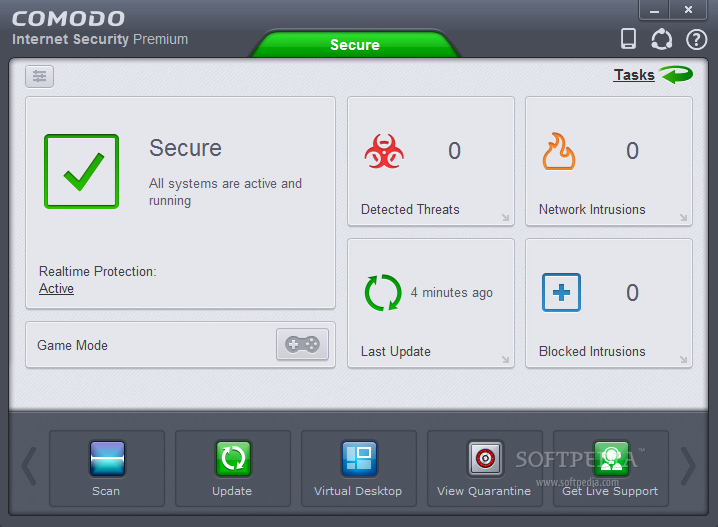
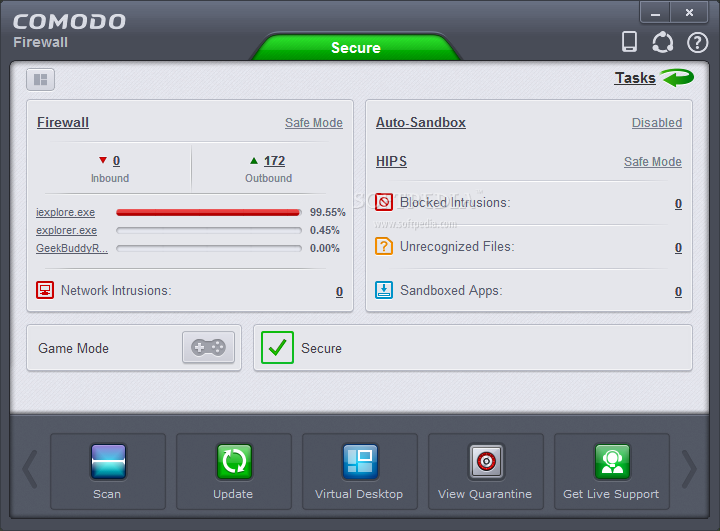
Previously I was sharing comodo firewall. I still talk about Comodo software, If you still do not feel the full protection of this software, I suggest you to make use of the full protection of Comodo Internet Security. Here's an explanation of this software:

Pict from softpedia 


COMODO Internet Security Premium description

Award-winning Comodo Firewall and Antivirus protection for PCs

Complete protection against viruses and Internet attacks for Windows computers. Comodo Internet Security was developed to be a free, multi-layered security application that keeps hackers out and personal information in.
Built from the ground upwards with your security in mind, Internet Security offers 360° protection by combining powerful Antivirus protection, an enterprise class packet filtering firewall, and an advanced host intrusion prevention system called Defense+.
Unlike the stripped down versions of commercial software that other software vendors offer for free, this is the full, completely functional version of the product.
Here are some key features of "COMODO Internet Security Premium":

Default Deny Protection(DDP):
· Only known and listed PC-safe files and applications are able to access your PC.

Prevention-based protection:
· Firewall and Antivirus combine to stop viruses and malware before they enter the PC.

Sandbox technology:
· The sandbox is a virtual operating environment for untrusted programs – ensuring viruses and other malicious software are completely isolated from the rest of your computer.

Personalized protection alerts:
· Firewall quickly learns the rules you set for downloading software, and adjusts its alerts accordingly to fit your needs.

Real-time access to updated virus definitions:
· Automatic updates mean greatest possible protection possible against zero-day threats.

One-click virus scanning:
· Make sure your PC is clean with one simple button click.

Uncluttered, user-friendly interface:
· Quickly navigate through the various parts of Firewall protection without getting lost.

Thorough security "wizards":
· Preset security settings for simple point-and-click setup.

Unique "slider" to easily change your current security level:
· Easily switch between presets to reflect your security preference at any given time.

Exclusive access to Comodo's "safe-list":
· List of over two million known PC-friendly files and applications so safe files and apps are allowed to run.
Requirements:

· 128 MB RAM
· 210 MB hard disk space
What's New in This Release:

· IMPROVED! WEB installer now supports more reliable installation experience e.g. support for resuming broken downloads
· IMPROVED! Program updater now uses a new updating mechanism which reduces the update size significantly
· IMPROVED! Minor GUI fixes and corrections
· FIXED! Various incompatibilities between BO defense and various applications(e.g. games, windows applications etc.)
· FIXED! License manager does not work properly when system time is modified
· FIXED! Various crashes related to the antivirus engine

If you want to try using this free software, please click on the link below :

Comodo Internet Security Installer x86 (32bit OS)
Comodo Internet Security Installer x64 (64bit OS)


Comodo Firewall

Comodo firewall is a firewall for free, but his ability is not inferior to other software that is paid. I use this firewall to protect my PC. Here's an explanation of this software:


The Comodo Firewall application offers the highest levels of security against inbound and outbound threats, stealths your computer's ports against hackers and blocks malicious software from transmitting your confidential data over the Internet. Comodo Firewall makes it easy for you to specify exactly which applications are allowed to connect to the Internet and immediately warns you when there is suspicious activity.

Comodo's award-winning firewall provides users with prevention-based PC protection that slams the door shut on viruses, malware, and hackers. Firewall is also a part of Comodo Internet Security Pro 2011, which gives you the most robust defense and inlcudes other components like WiFi security, live 24/7 expert assistance for numerous computing needs.


Here are some key features of "Comodo Firewall":

Default Deny Protection:
· Makes sure that only known PC-safe applications execute

Prevention-based security:
· Stops viruses and malware before they access your computer…so it isn't too late to stop them.

Auto Sandbox Technology:
· The sandbox is a virtual operating environment for untrusted programs – ensuring viruses and other malicious software are completely isolated from the rest of your computer

Personalized alerts:
· Firewall remembers which software is allowed to operate and changes its alerts accordingly.

Cloud based Behavior Analysis:
· Cloud based behavior analysis system detects zero-day malware INSTANTLY.

Cloud based Whitelisting:
· Cloud based whitelisting of trusted publisher easily identifies a safe file and vendor

Game Mode:
· Suppresses operations that could interfere with a user’s gaming experience such as alerts, virus database updates or scheduled scans.

Application Control:
· Provides users with the ability to lockdown their PC so only known good applications can run.

Automatic updates:
· Stay current with the latest protection.

Precise and specific alert system:
· Warnings specify the level and type of possible threat from each source.

Easy to configure:
· Tell the free firewall to scan upon installation and add all current applications to the safe-list.

Detailed summary screen:
· Easily access an at-a-glance snapshot of current security settings

Uncluttered, user-friendly interface:
· Quickly navigate through the various parts of Firewall protection without getting lost

Thorough security "wizards":
· Preset security settings for simple point-and-click setup
Exclusive access to Comodo's "safe-list":

· List of over two million known PC-friendly files and apps. Privdes free firewall protection with the knowledge to let safe files and apps run.

'Training Mode' lets Firewall automatically create 'allow' rules:
· Firewall software learns your trusted programs to minimize alerts
Requirements:

· 128 MB RAM
· 210 MB hard disk space
What's New in This Release:

· IMPROVED! Installation experience on Windows 7 and later
· IMPIOVED! Realtime performance impact to the daily PC operations should be lower in this version
· FIXED! HIPS doesn't block some actions that can be used by malware
· FIXED! HIPS doesn't block modifications to the protected files under certain conditions
· FIXED! Firewall sometimes blocks safe applications such as MSN messenger, Skype
· FIXED! Some installers crash when CIS is installed
· FIXED! Firewall does not detect MAC Spoofing although "Protect the ARP Cache" option is selected
· FIXED! Firewall cuases high DPC latency under certain conditions
· FIXED! Antivirus crashes while scanning specially crafted .PST files
· FIXED! Antivirus crashes after or during virus database updates


If you want to try using this free software, please click on the link below :
 Comodo Installer X86 (32bit OS) 
Comodo Installer X64 (64bit OS) 

PeerGuardian

I'll share some software firewall for a few posts in the future. Now I want you to feel the greatness some free firewall. The first is PeerGuardian. Here is an explanation of this software:

 Pict from softpedia

PeerGuardian works by blocking and logging all TCP/IP connections to and from known IP ranges used by known P2P foes, such as the RIAA, MPAA, MediaForce, MediaDefender, BaySTP, Ranger, OverPeer, NetPD, and more.

PeerGuardian is a powerful, yet small firewall program that was especially designed for P2P users who want to protect their computers from unauthorized searches instigated by private agencies and corporations.

To make sure that the block-list used to block malicious connections is up to date; PeerGuardian uses an on-line block-list Database that is continuously updated on a daily basis -- so your privacy will remain safe while swapping files.

PeerGuardian is compatible with all TCP/IP based file sharing applications, such as Kazaa, iMesh, LimeWire, eMule, Grokster, DC++, Shareaza, and more. In short, PeerGuardian is the must have tool for any file swapper.

PeerGuardian is not advertising supported, nor does it require registration, and no information is collected from or about product users.  

If you want to try using this free software, please click on the link below : 

PeerGuardian Installer